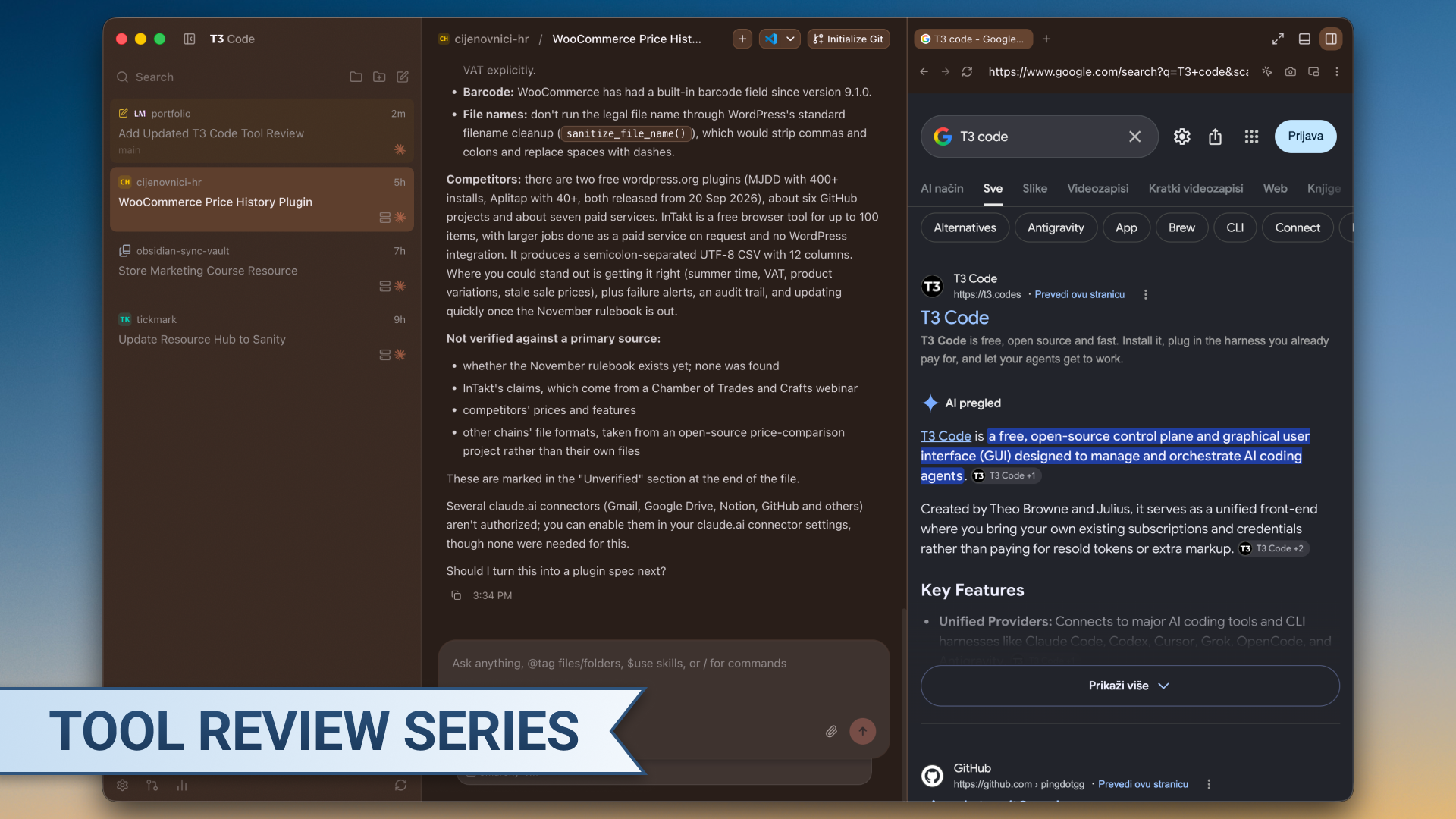
Tool: T3 Code
Category: AI Coding / Desktop App
Pricing: Free, open source, bring your own subscription
In March I called T3 Code alpha software that feels like alpha software. Six months later, even though it is technically still in alpha, it is a whole different feel.
What Changed
When I first reviewed T3 Code it was on v0.0.11. It ran Codex only, Claude Code support was “planned,” and I told you not to make it your main tool for client work. I gave it 3.5/5.
With 0.0.42, Claude Code support is live, it has a better look and feel, it is more customizable and so much more.
It finally feels made for real work. Running several projects in parallel, while still being on top of things, is kinda what it excels at now.
A sidebar that keeps up with parallel work
Filtering in the sidebar is much better. Projects have icons, and you can see each agent’s status at a glance: still working, waiting for your input, or failed, and what is running in threads. When you’ve got three or four things building at once, you stop losing track of what’s running where. You also stop clicking into threads just to check whether they’re done.
Work that names and settles itself
This is my favorite addition. T3 Code now uses a smaller model to name each thread based on what it’s working on. It sounds minor until you find yourself working on 2 PR reviews, 1 thread regarding AWS blue-green deployment research and another 3 bug fixes. If you run agents in herdr, the Claude Code CLI or similar terminal tools, you’re naming every session by hand, which is tiring to be real.
Threads also “settle” on their own. When you close or merge a PR, the thread tied to it gets put away. Old chats stay easy to find through filtering, but they don’t clutter the sidebar a month after the work is done.
Every PR and change easily viewable
Every PR an agent creates gets linked to its thread automatically. You can see the newly created PR right away in the right sidebar, check the code changes or any comments and merge it. As simple as that. No need to open a browser and go through GitHub manually.
Browser, terminal, files and devices in one window
The built-in browser lets you see changes without switching windows, if you are a web developer. Next to it you’ve got a devices panel which you can connect to your local mobile simulators, then a terminal and finally a simple file view. That’s all great if your builds work through a VPS or a home server, everything is so seamlessly implemented into 1 app.
Sync across iPad and iPhone
T3 Code now syncs across devices, so you can watch your projects progress from your iPad or iPhone.
A few weeks ago, I was waiting outside a fitting room at Zara while my girlfriend tried on clothes. Instead of scrolling through classic X posts made by AI, I checked on my agents and did some research regarding new features for a project. Even though…work being able to follow you like that is either a great sign or a warning sign, depending on how you look at it. Either way, it works.
The catch is that your workflow has to fit the tool. My old setup was a parent folder with a CLAUDE.md, my coding standards and an explanation of which repositories live inside it, with every GitHub repo for the project nested underneath. That setup doesn’t fit T3 Code well.
Subagents are the other rough spot. From what I can tell, each session runs through Claude’s -p flag, so context is handled differently than in the CLI (most affected are some plugins that work on saving the context etc.). In practice, subagent behavior isn’t predictable. Sometimes the main model calls them on its own and sometimes it doesn’t. Sometimes it sticks to the subagent’s task, and sometimes it spins up another subagent that has nothing to do with it. Claude Code in the terminal gives you more control here.
T3 Code leans on skills instead. Combine it with a skill like handoff from Matt Pocock and run the next step yourself, and you end up close to where multiple subagents would get you. It’s a different way of working, not necessarily a worse one. But depending on your system, expect to spend some time adjusting.
March vs Now
| March 2026 (v0.0.11) | Now (v0.0.42) | |
|---|---|---|
| Agents | Codex only, Claude Code “planned” | Claude Code supported |
| Parallel projects | Worse than alternatives | Sidebar filtering with per-project status (working / needs input / failed) |
| PRs | Simple commit + push buttons | Full Git capabilities, including viewing PRs from within the app |
| Preview | Not in my first review | Built-in browser, simulators/emulators, all works remotely |
| Mobile | Not in my first review | iPad and iPhone sync |
Pros
- Built for parallel work: sidebar filtering and status icons show which agent is working, waiting on you or failed, across every project
- Auto-named threads: a smaller model names each thread, so you never rename sessions by hand again
- Git CLI integration: full git integration, PRs, pushes, commits, cherry pick…
- Threads clean up after themselves: closing a PR settles its thread, and old chats stay searchable without cluttering the sidebar
- Everything in one window: browser, terminal, files, GitHub and device previews, including simulators over SSH and the Android emulator on Linux
- Mobile sync: check on and push projects forward from your iPad or iPhone
Cons
- Your workflow has to adapt
- Subagents are unpredictable: sometimes they get called, sometimes they don’t, and sometimes an unrelated one spins up. The Claude Code CLI gives you more control
- No browser preview on iPad: sync is there, but the in-app browser would be great on iPad too
- Plan limits matter: I’m on Anthropic’s Max 20x plan, so I can run big models in parallel without watching usage. But different context handling, token saving plugins behaving differently or such issues can bleed your 5 hour session limit rather quick
Verdict
If you run several coding agents at once, especially across multiple projects, T3 Code is now one of the best ways to keep track of them. The status sidebar, auto-named threads and Git integration cut out most of the “administration” that comes with parallel agent work. If your builds run on a remote machine or you want to check in from your phone, it’s even easier to recommend.
If you tried T3 Code in March and didn’t like it, give it another go. I think you’ll change your mind.
Rating
Overall: 5/5